quake3 lightgrids in Unreal
2023-07-17
In a previous post I described the challenges and process behind using quake3 lightmapping in Unreal. That goes over lightmapping (and how it differs in modern engines from classic engines), and specifically how the first three idtech engines calculated and stored lightmaps, as well as challenges in bringing them into Unreal.
Notably, the ending talks about using Unreal lights for the "lightvol" (properly called "lightgrid"). This was a hacky thing I was never particularly proud of, and also sapped quite a lot of iteration time for no reason. What if we could bring quake lightgrids in, too?
- What is a lightgrid?
- How different were classic games’ lightgrid strategies?
- Quake lightgrids
- Unreal data strategy
- Trilerp
- Decals, emissive, base color, and global unreal light
- Aside: CPU or GPU
What is a lightgrid?
A lightgrid represents the light inside a space, rather than light that spills onto static geometry. In simpler terms, it’s what shades entities as they move through a lit space. The world is divided into a 3d grid of evenly sized cells, each with a color value. An actor’s position is used to determine which cell they’re in, and when rendering the cell’s color is applied to the actor’s mesh.
That’s the simplest explanation, but the specifics of how lightgrids were made, and are currently made, is something of a science unto itself. Grids need not necessarily be regular, their resolution can be extremely high, and the meshes do not need to be evenly lit by a cell (different vertices can exist in different cells).
I’m also going to completely leave aside directional lightgrid components for this - partly because i have no interest in porting them for this project, but also because they greatly muddy the waters. Let’s just pretend cells have a color, and nothing else. I’ll also emphasize here that I’m not a rendering engineer, so the specifics of what modern engines actually do for/with lightgrids is a mystery to me. I know only enough to say they’re different.
How different were classic games’ lightgrid strategies?
While everyone uses a grid of cells with color values, the difference is how the values are interpolated as entities move between cells.
Without interpolation, entities would suddenly change lighting as they moved between cells. Below is an example of that; note the weapon the player is holding changes light levels suddenly, as the player moves between darkness and light.
| thief 2 |
|---|
note, Sean Barrett has indicated that Thief didn’t actually generate a lightgrid, and "might" have done floor lightmap sampling
but the example shown here is still illustrative, since that’s what it looks like to my eyes, and is roughly analogous to an un-interpolated lightgrid
However with some interpolation, you can have the same number of cells and blend between them. Here’s a goldsrc example, showing that while it does seem to interpolate a bit, the values still change relatively suddenly. You can see the light (especially on the top of the crowbar) "judder" a little as the player moves from light to dark.
| half-life 1 |
|---|
Finally, you could do trilinear interpolation to have the smoothest transition between cells and no "judder". Below is an example from MOHAA, note again the light values on the gun itself as the player moves between darkness and light, perfectly smooth, no judder at all.
| medal of honor: allied assault |
|---|
We’ll go over interpolation later, in the #trilerp section.
Quake3 lightgrids
see q3’s tr_light.c and tr_bsp.c
In Q3 bsp’s, lightgrid cells are in Lump 15. They’re a one-dimensional array of structs which each contain an "ambient" color, and a "directional" color (as well as two angles for calculating direction). Each cell is regularly sized, and the default is 64x64x128. The cells are in a rectangular grid, the dimensions of which can be found by doing some quick math on the level geometry’s mininum and maximum extents (the smallest vertex value in each dimension, and the largest, respectively).
Psuedocode;
cellCounts = (mapMaxExtent - mapMinExtent) / cellSize
When we want to find the cell for a given world location, we do the following;
v = (loc - mapMinExtent) / cellSize
cellIdx =
	(v.z * cellCounts.X * cellCountsY) +
	(v.y * cellCounts.X) +
	(v.x)
And from that, can use the cell’s ambientColor to shade the entity. Note that Quake3 uses a form of trilinear interpolation, which is how it got its lightgrid to look so smooth, and why its grid resolution can be comparatively low without sacrificing quality.
Unreal data strategy
There are four parts to what I did for porting all that into Unreal;
- meta datatable - defines map extents and cell counts, each row is a level
- exported to a json file by
q3bsp2gltfduring map compile - See FQLightgrid.h
- exported to a json file by
- cell datatable - defines each lightgrid cell, one table per level, table key is just numeric index
- exported to a csv file by
q3bsp2gltfduring map compile - See FQLightgrid.h
- exported to a csv file by
- lightgrid component - updates parent actor (and all children/attached) materials’ "lightgrid" value every tick
- materials - accept lightgrid param and multiply
- (not even worth a screenshot, it’s just texture
emissive = texsample * vertColor * lightgrid)
- (not even worth a screenshot, it’s just texture
Per-level there’s a singleton (hpp / cpp) that gives the lightgrid component information about which cell table to use (and which meta table row to use), which lightgridupdater components refer to in BeginPlay. That way, every updater knows the appropriate map size and has access to the correct lightgrid table, without needing to be manually specified more than once (per map).
Note that this can have the effect of preventing us from using level streaming effectively, since we’re so heavily tied to per-map values and singletons.
Trilerp
Quake games used trilinear interpolation to smoothly transition between cells, and give the impression of higher grid resolution.
The implementation here is interesting, and at first i simplified by doing a standard (Graphics Gems 4) trilerp implementation - which worked but tended to take light from void cells when near a wall (meaning you’d randomly get black colors). Upon reimplementing id’s strategy, everything worked as expected.
However, this can have the effect of looking too good. Depending on the aesthetic you’re going for, you might want more or less sudden changes in entity lighting. Thus the "trilerpSteps" parameter of the updater component (hpp, cpp), which approximates a lower positional resolution than actually exists. This can balance the effect of games without interpolation (but higher lightgrid resolution) with those with it (but usually with lower resolution).
| nearest sample (darkengine-esque) |
|---|
| trilinear sampling (q3-esque) |
|---|
| "stepped" sampling: 3 (goldsrc-esque) |
|---|
Decals, emissive, base color, and global unreal light
In the previous post I used a material that output an emissive color. This works fine - if the static geometry is the only thing in the level. However I found that decals tended to take on a transparent / glowy nature, which makes sense - they’re emissive. This means that the proper course is to make the materials output on base color, so that they’re not considered "lights" and have proper opacity. Like below;
| Lightmapped surfaces | Entity surfaces |
|---|---|
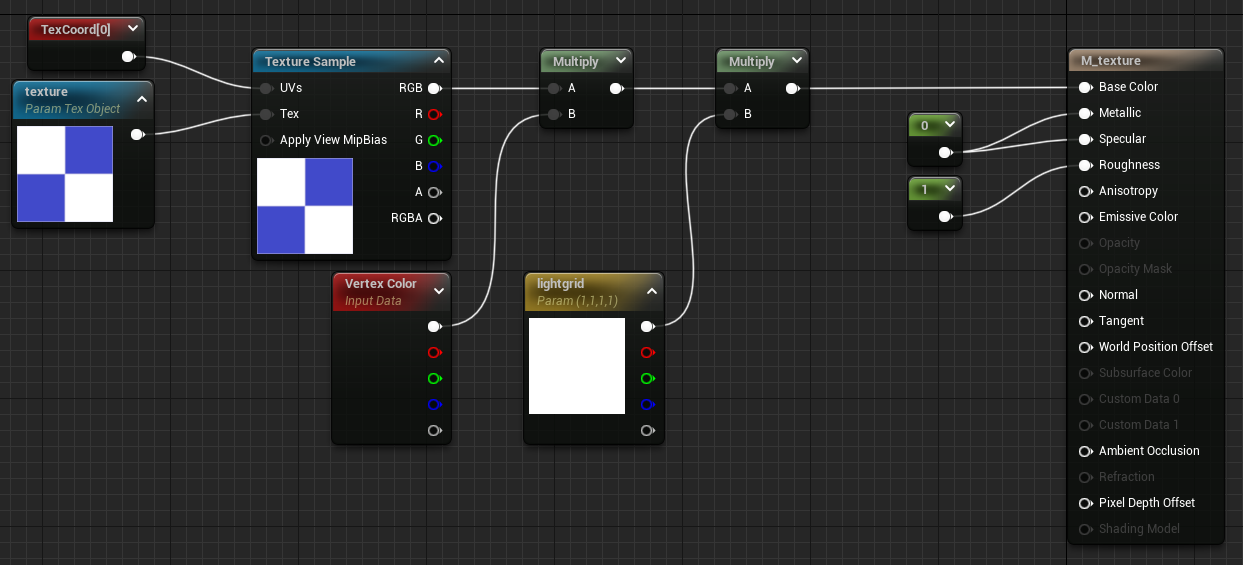 |
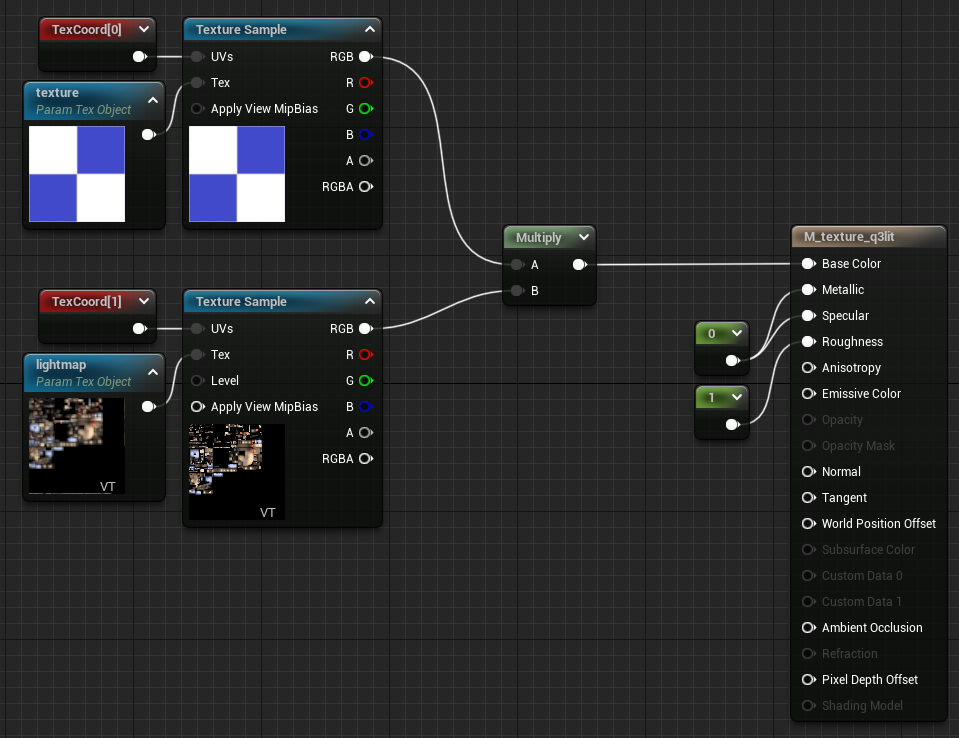 |
And for completeness, here are the versions of the above for translucent surfaces (the only difference being that Blend Mode is ‘Translucent’ instead of ‘Opaque’). Deferred decal is the same setup as translucent, just with a different domain.
| Translucent lightmapped surfaces | Translucent entity surfaces |
|---|---|
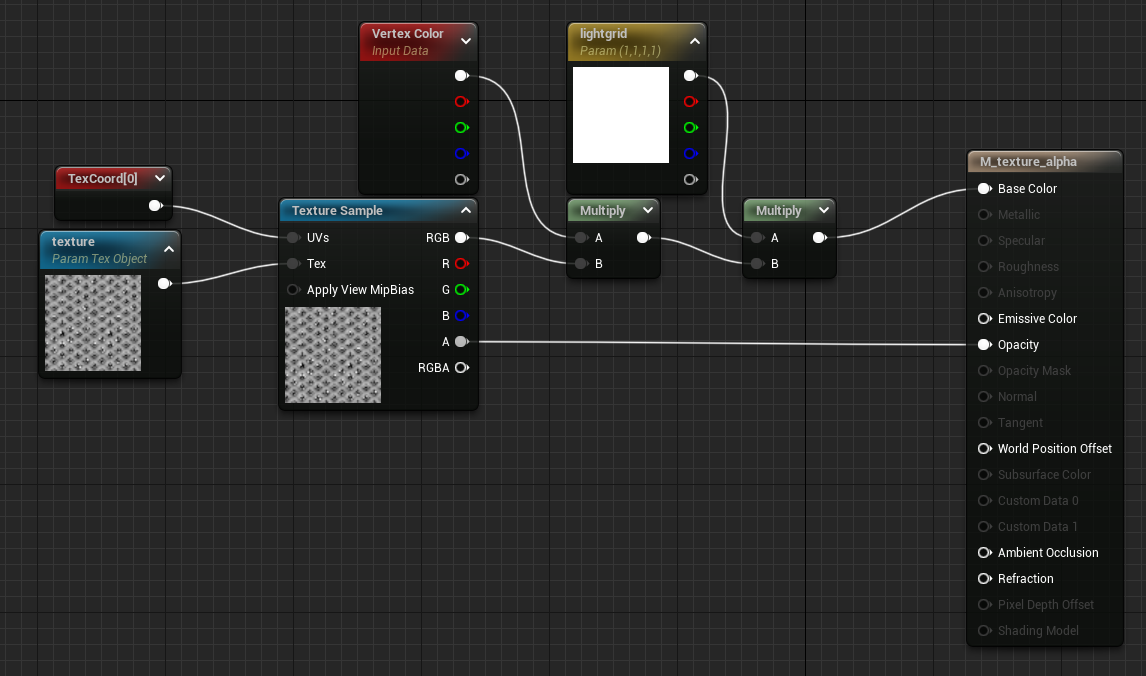 |
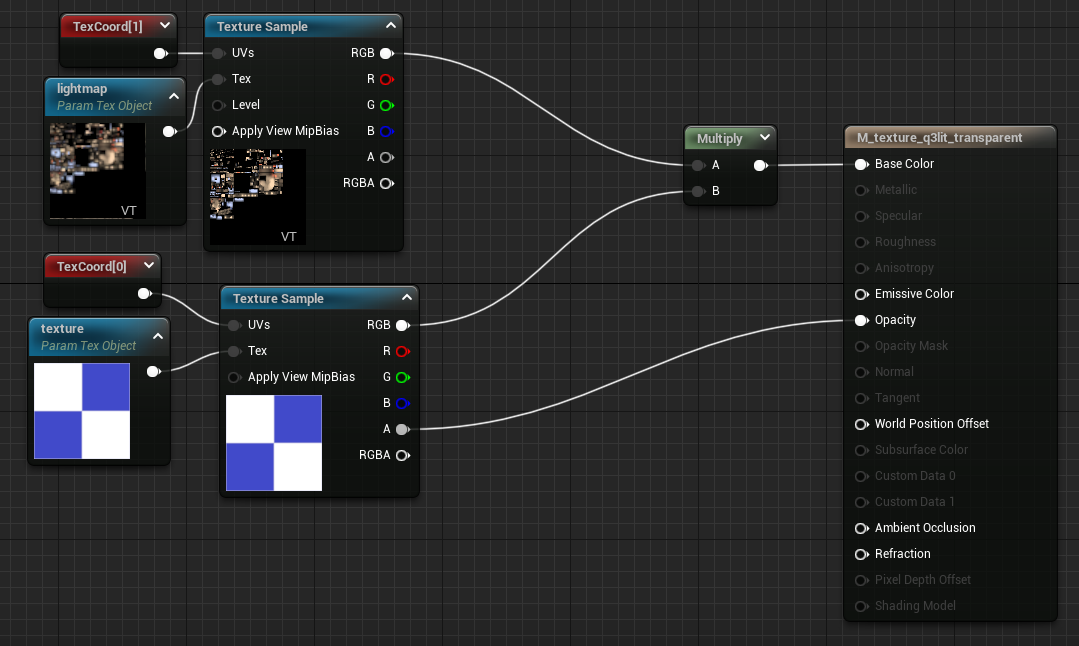 |
However, base color is only visible if there’s light shining on it. I needed to use base color for all my materials (lightmapped and not), but i ultimately wanted Unreal to treat that as an globally-evenly-lit surface. In other words, I needed an Unreal ambient light.
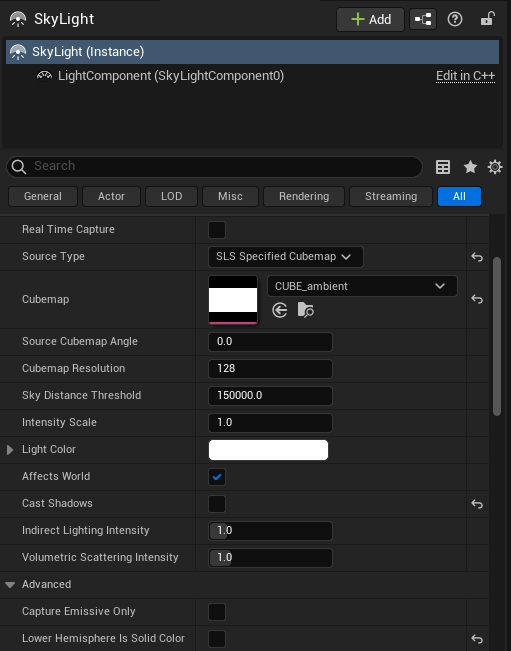
That means we need a Sky light (not actually a "sky" light, but a global cubemap hdri that lights all surfaces). We have to untick ‘Lower Hemisphere Is Solid Color’, and set a pure-white cubemap, which we’ll have to create.
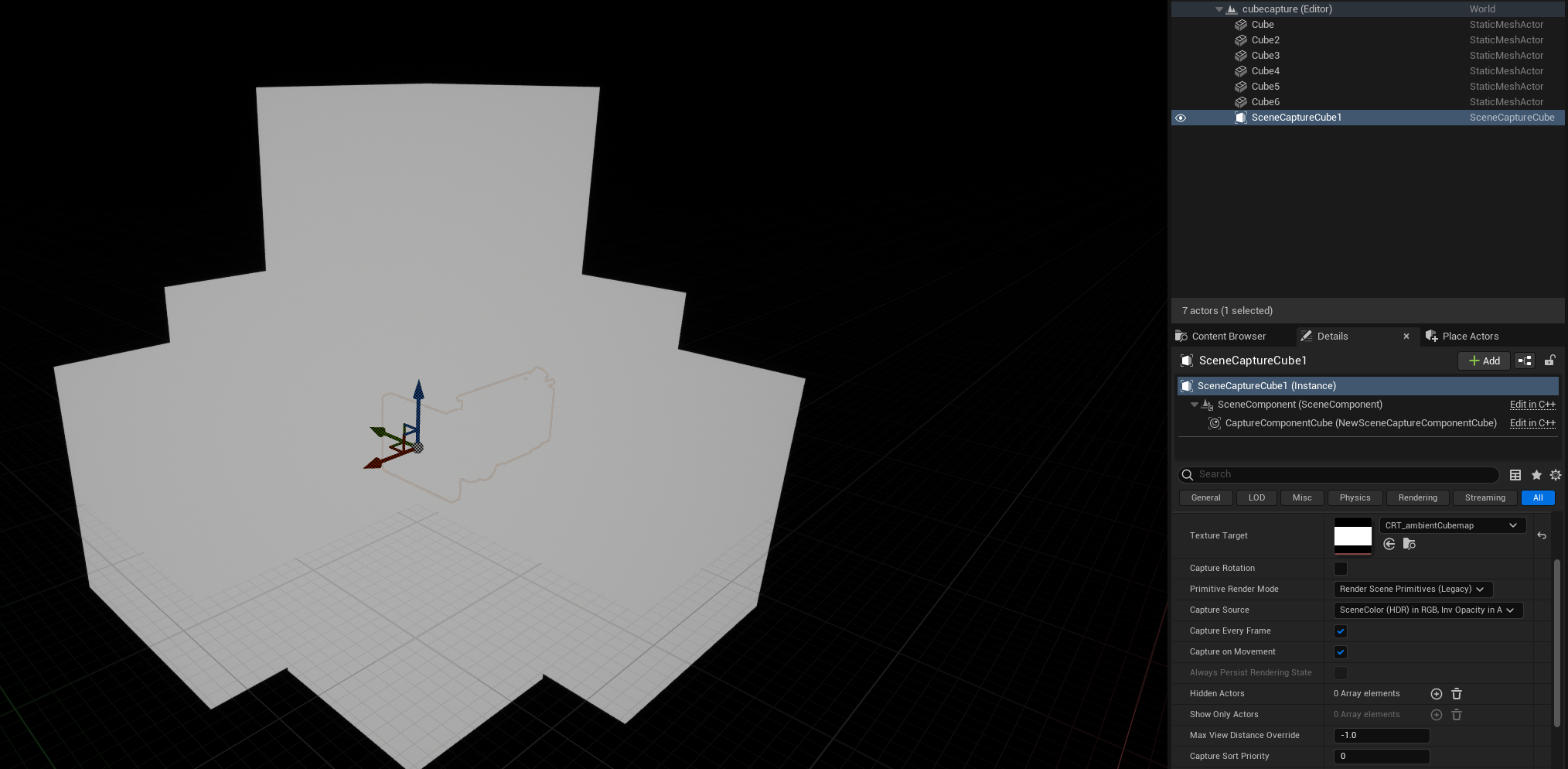
Unfortunately HDRI’s are annoying to make. GIMP can’t do it, Blender can but the settings are obscure (and took too long). Instead I used this tutorial as a refresher on capturing hdri’s in Unreal itself, surrounding a capture camera with pure white unlit brushes.
| Capture scene settings | Per-level skylight settings |
|---|---|
 |
 |
That done, every surface in the world is base-colored and lit evenly – mimicking older renderers.
Aside: CPU or GPU
Lightgrids were traditionally calculated on the CPU, for several reasons.
- GPU may not exist in the first place, and if it did it may not support shaders
- No data needs to be uploaded to (limited) gpu memory
- It wasn’t feasible (at the time) to do per-vertex or per-pixel lightgridding, so per-mesh lighting made sense on cpu, since we’d only be sending a single uniform value (or just color1) to be blended
- You can also sample lightgrids for gameplay purposes - to determine how "visible" an enemy is (for stealth)
I have no insider information on this, and i haven’t looked at source for modern engines, but I’d expect much of lightgrid influence these days is done on gpu, with a variety of 3d textures with trilerp, probably with variable resolution and much more directional details.
So, there’s a question here - should we do our "lightgridding" port in a material (and therefore, gpu)? Or should we do it entirely in cpu and send down a material instance parameter (what amounts to a uniform)?
We could imagine an implementation that exports Quake lightgrids as images, Unreal loads them (where every Z is a predefined mip), perhaps it could even be atlassed and UDIM’d in the way we did for lightmaps (so that only part of the lightgrid needs to be streamed). After all, lightgrids are pretty small color data, at a resolution of 64x64x128, a large map that’s 10240x10240x1024 would come down to 8 mips of a 160x160 texture. Or, if we wanted to forego mipping (and therefore trilinear) and atlas the whole thing, it’d be something like 1280x1280. That’s a lot for back in the day, but trivial today - easily fits into a 2k texture. We could even encode things like map extents and cell counts into some part of it.
However, why? We’re aiming for a classic look, and driving a single uniform per-mesh is both easier and more faithful. It’s ultimately less "work" to port into Unreal, and doesn’t involve any problems with padding atlasses or generating mips. We can be completely unconcerned with performance, since nothing we’re doing will stress machines from the last decade. And of course, if there’s any desire to have lighting affect stealth, this makes it trivial to do.
